Ham Radio Made SimpleKW3KW
FREE · OPEN SOURCE · WINDOWS + LINUX

Free ham radio software, made simple

Programs for running your station from the computer: rig control through flrig, a station list that tunes your radio, live JS8Call maps and chat, an offline callsign lookup, and a launcher that opens them all in order with one click. Made by KW3KW of the Ham Radio Made Simple YouTube channel, for hams who want things to just work.

The apps

Every download is free. The download button always gets the newest version.

RigPanel

Control your IC-7300 or FT-891 from one screen

Windows and Linux · works through flrig

  • Tune, change bands, VFO A/B, split and RIT; meters for S, power, SWR and ALC.
  • Voice / Data / CW buttons set mode, width, levels and radio menus in one click.
  • Default Settings puts your radio back the way you like it, and tells you what changed.
  • Tap Ctrl in any program and RigPanel jumps to the front.
  • Because it goes through flrig, WSJT-X, JS8Call and fldigi keep sharing the radio.
  • Other radios flrig supports work for the basics; more Icom and Yaesu models can be added.
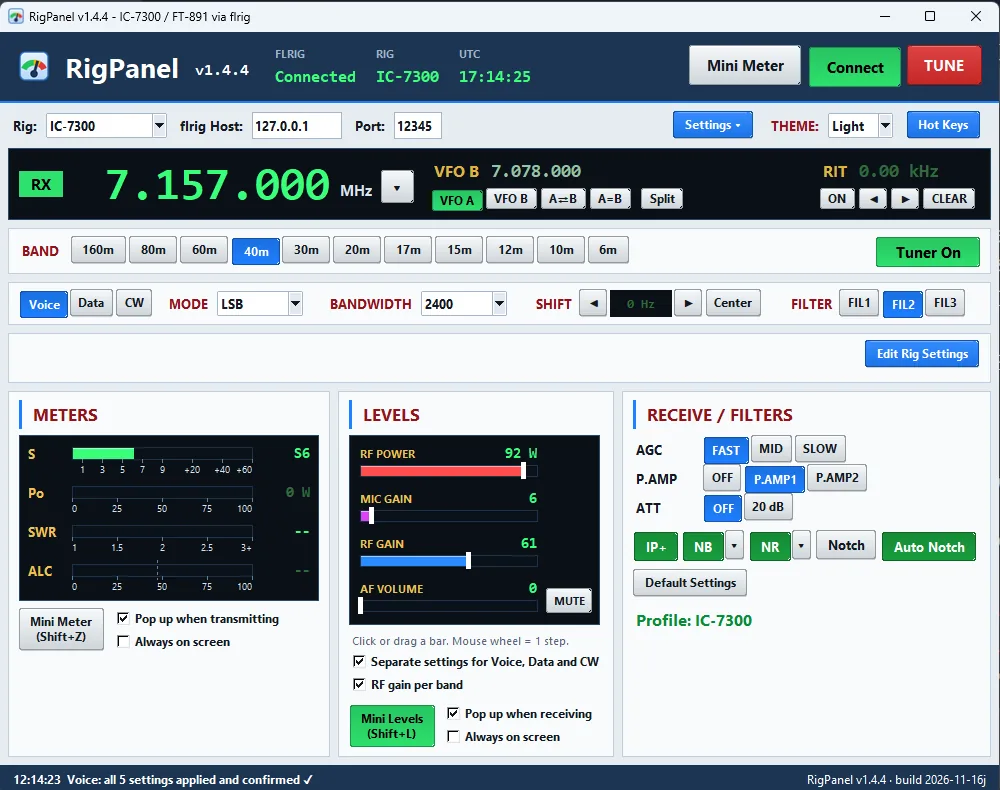
RigPanel main window controlling an IC-7300 on 40 meters
RigPanel with an IC-7300 on 40 m

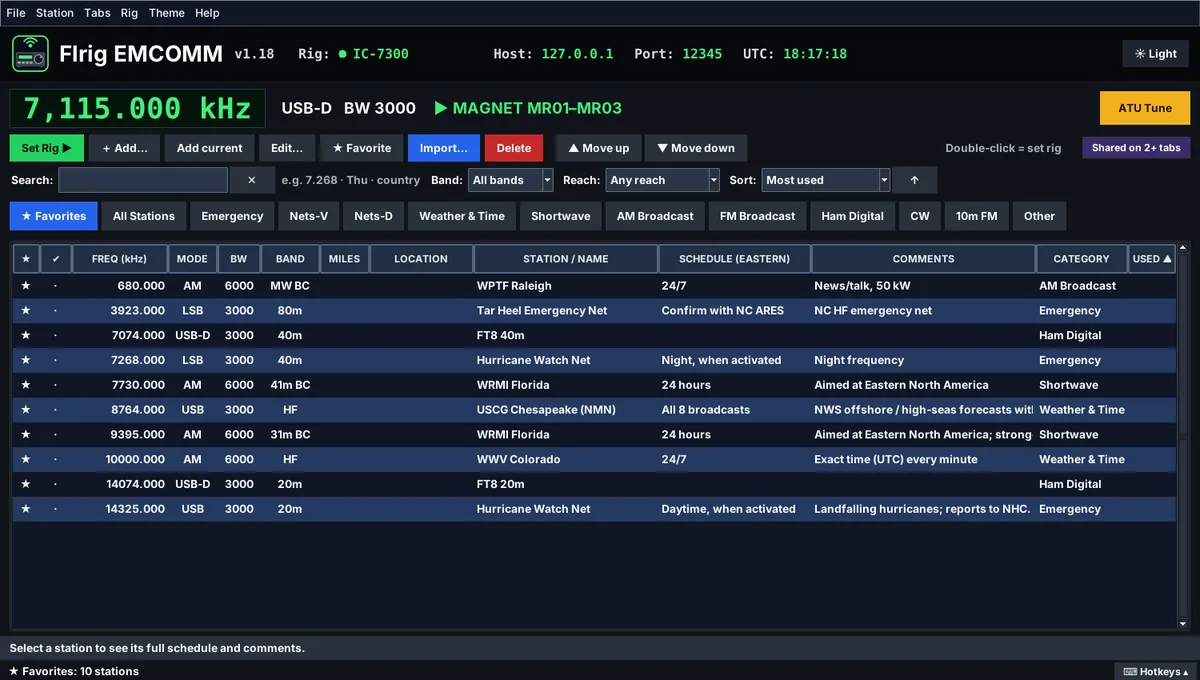
Flrig EMCOMM

A station list that tunes your radio

Windows and Linux · works through flrig

  • Double-click a station and the radio goes there: frequency, mode and filter.
  • Tabs for nets, emergency, weather and time, shortwave, broadcast, digital and CW.
  • Starter list included: WWV, VOLMET, USCG weather, Hurricane Watch Net, MAGNET, AmRRON and more.
  • Search by name, frequency, band, mode or distance from home.
  • Build your own lists with any AI chat tool, or import a spreadsheet (CSV).
Flrig EMCOMM station list with favorites, nets and emergency frequencies
Flrig EMCOMM, dark theme

JS8Map Spotter

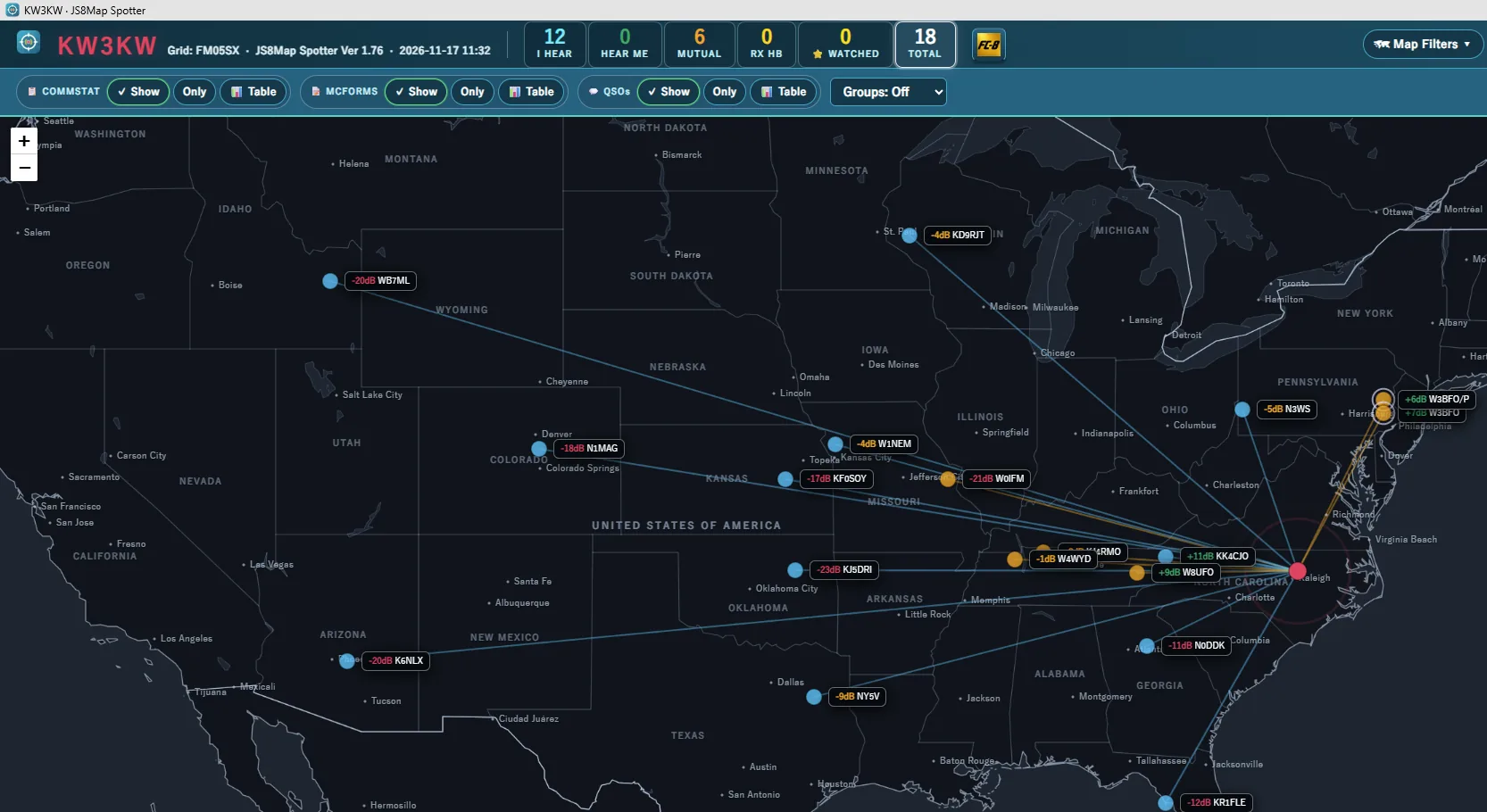
See every station JS8Call hears, on a live map

Windows and Linux · works with JS8Call

  • Stations placed from their grid or from FCC and Canadian license data; the map works offline.
  • Emergency traffic on top: CommStat StatReps, MCForms (F! micro forms) and alerts.
  • Shows QSOs between other stations and keeps a 7-day log of directed messages.
  • Never transmits on its own: nothing goes out unless you click send.
JS8Map Spotter map of the United States with JS8Call stations, signal reports and paths to the home station in North Carolina
JS8Map Spotter: stations heard on JS8Call, with signal reports and paths

JS8MapChat: JS8Map and JS8FastChat

A JS8Call map plus a fast chat window

Windows and Linux · works with JS8Call

  • JS8Map plots the stations JS8Call hears, with relay paths and filters for who hears whom.
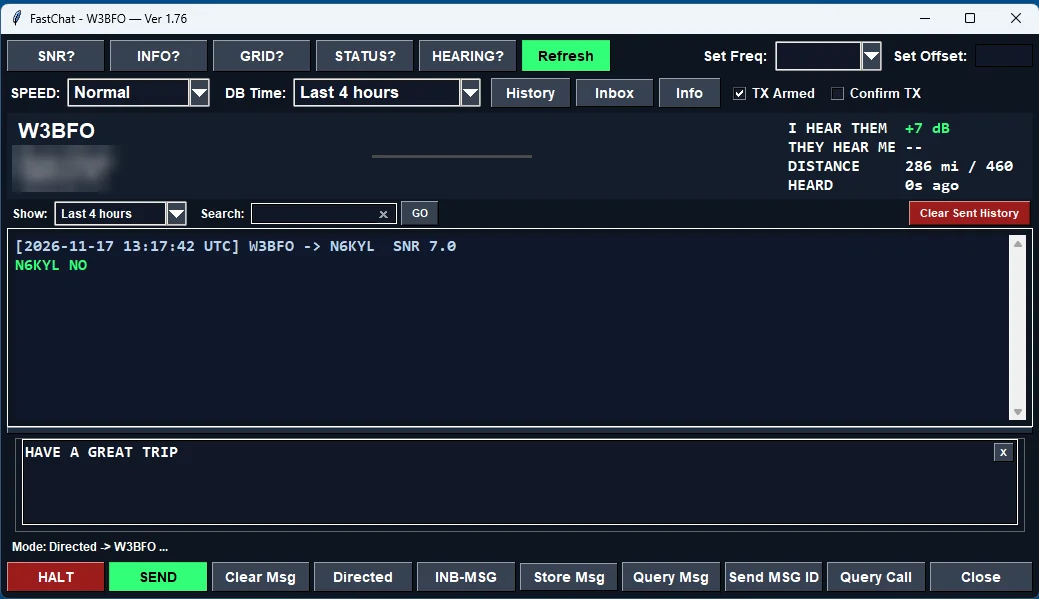
  • JS8FastChat is a compact chat window for working one station, with an inbox and watch words.
  • Each runs on its own; run both and a button in each brings the other forward.
JS8FastChat window working one station, with signal report, distance and quick query buttons
JS8FastChat: working one station, with SNR, distance and one-click queries

FCC Lookup

Offline callsign lookup, U.S. and Canada

Windows and Linux

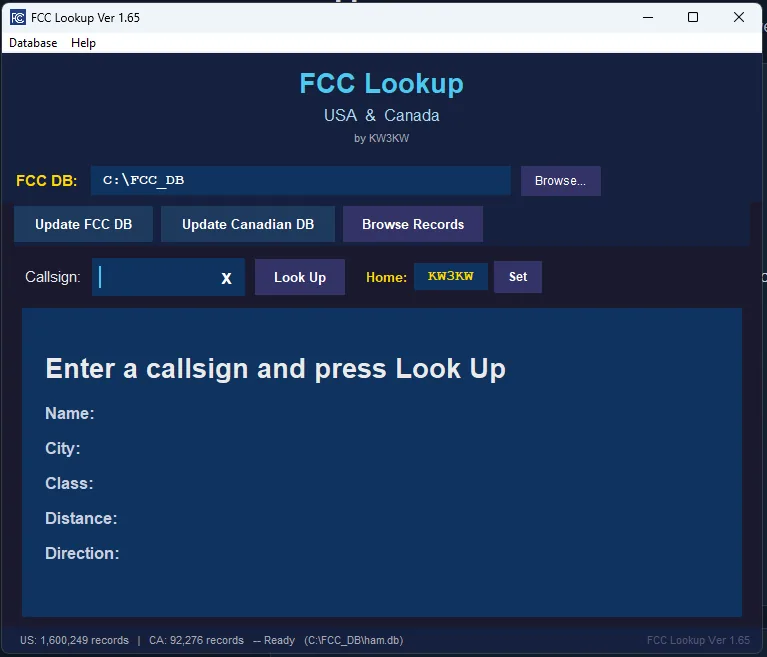
  • Type a callsign, get the licensee, with no internet needed once the database is built.
  • Builds its own database straight from the FCC and ISED Canada, and updates it when you ask.
  • Distance and bearing from your home station; shares its database with JS8Map.
FCC Lookup window with U.S. and Canadian license databases loaded
FCC Lookup: 1.6 million U.S. and 92,000 Canadian records, offline

DigiApp Launcher

Start your whole digital station with one click

Windows and Linux · starts flrig, JS8Call, Fldigi, WSJT-X and more

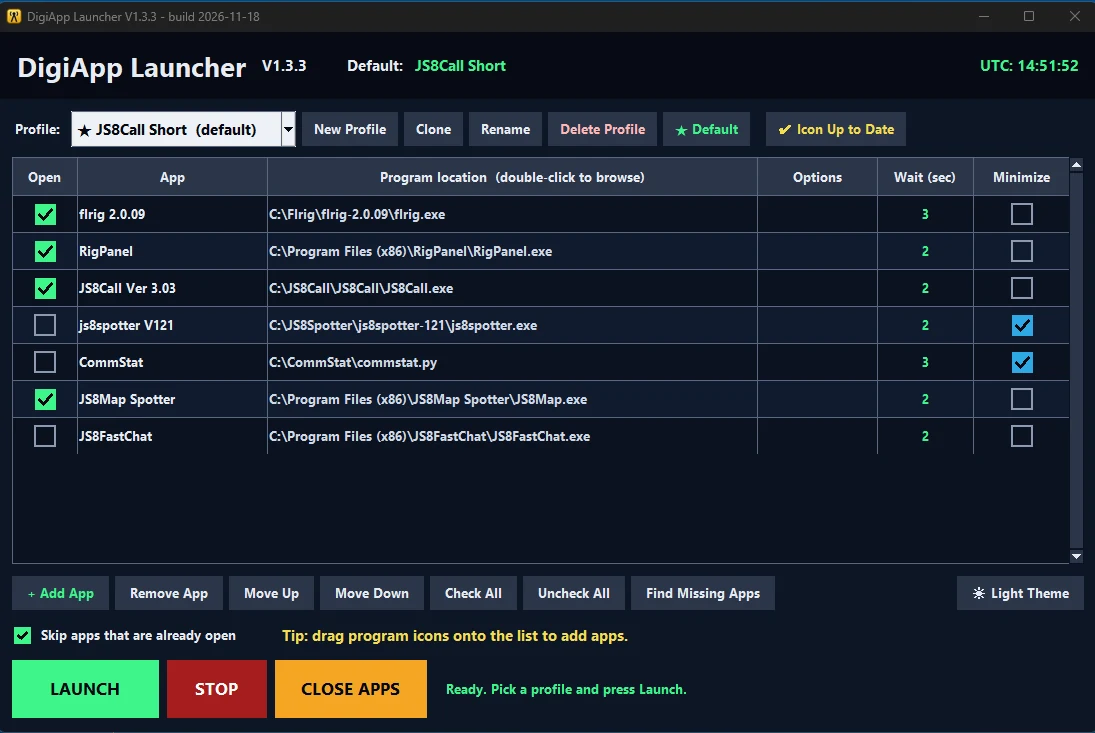
  • Opens your programs in order, waiting the seconds you choose so each one is ready before the next.
  • Profiles for each setup (JS8 net, Fldigi messaging...): click the taskbar or panel icon for your default, right-click for the others.
  • Close Open Apps shuts everything down in reverse order and waits for any “Save changes?” question.
  • Starts the other apps here too: RigPanel, JS8Map Spotter, JS8FastChat, FCC Lookup.
  • Add programs from the installed-apps list or by drag and drop; minimize the ones you don’t need to see; light or dark look.
DigiApp Launcher editor with a JS8Call profile: flrig, RigPanel, JS8Call, JS8Map Spotter and JS8FastChat in order, with wait times and minimize boxes
DigiApp Launcher: one profile opens flrig, RigPanel, JS8Call and JS8Map Spotter in order

Getting help

Start with the guide

Each app has a Quick Start or install guide as a PDF, linked from its page on GitHub.

Found a problem?

Open an issue on that app's GitHub page (the Issues tab). Say which radio, which app version and Windows or Linux.

You'll need flrig or JS8Call

RigPanel and Flrig EMCOMM talk to your radio through flrig. The map and chat apps work with JS8Call.

Free and open source

All apps are free and open source (GNU GPL; DigiApp Launcher uses the MIT license). The code is on GitHub.